|
Case studies include information about actual recoveries
completed within our lab. You may find similar symptoms to a problem
you are having with your drive. Here are a couple of recent cases:
• 250GB
Seagate Clicking
• 1TB Raid
0
|


|
|
**No Evaluation Fees / No Attempt Fees** Free evaluation and free external hard drive with every successfull recovery. You pay nothing unless your data is recoverable. Call now for a free quote: 1-800-717-8974. |
Hard Drive Read/Write Head
Disk read/write heads are mechanisms that read data from or write data
to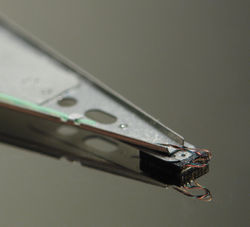 disk drives. The heads have gone through a number of changes over the
years.
disk drives. The heads have gone through a number of changes over the
years.
In a hard drive, the heads fly above the disk surface with clearance
of as little as 3 nanometres. The "flying height" is constantly decreasing
to enable higher aerial density. The flying height of the head is controlled
by the design of an air-bearing etched onto the disk-facing surface. The
role of the airbearing is to maintain the flying height constant as the
head moves over the surface of the disk. If the head hits the disk's surface,
a catastrophic head crash can result.
The heads themselves started out similar to the heads in tape recorders
-- simple devices made out of a tiny U-shaped piece of highly magnetizable
material called ferrite wrapped in a fine wire coil. When writing, the
coil is energized, a strong magnetic field forms in the gap of the U,
and the recording surface adjacent to the gap is magnetized. When reading,
the magnetized material rotates past the heads, the ferrite core concentrates
the field, and a current is generated in the coil. The gap where the field
is very strong is quite narrow. That gap is roughly equal to the thickness
of the magnetic media on the recording surface. The gap determines the
minimum size of a recorded area on the disk. Ferrite heads are large,
and write fairly large features. They must also be flown fairly far from
the surface thus requiring stronger fields and larger heads.
Metal in Gap (MIG) heads are ferrite heads with a small piece of metal
in the head gap that concentrates the field. This allows smaller features
to be read and written. MIG heads were replaced with thin film heads.
Thin film heads were electronically similar to ferrite heads and used
the same physics. But they were manufactured using photolithographic processes
and thin films of material that allowed fine features to be created. Thin
film heads were much smaller than MIG heads and therefore allowed smaller
recorded features to be used. Thin film heads allowed 3.5 in drives to
reach 4GB storage capacities in 1995. The geometry of the head gap was
a compromise between what worked best for reading and what worked best
for writing.
The next head improvement was to optimize the thin film head for writing
and to create a separate head for reading. The separate read head uses
the magnetoresistive effect which changes the resistance of a material
in the presence of magnetism. These MR heads are able to read very small
magnetic features reliably, but can not be used to create the strong field
used for writing. The term AMR (A=anisotropic) is sometimes used instead
of MR. The introduction of the MR head in 1996 lead to a period of rapid
aerial density increases exceeding 100% per year. In 2000 GMR, Giant Magnetoresistive,
heads started to replace MR/AMR read heads. In 2005, the first drives
to use TMR, tunneling MR, heads were introduced by Seagate allowing 400
GB drives with 3 disk platters.
In 2005, Seagate introduced TMR heads using integrated heaters to control
the shape the pole-tip region of the head during operation. The heater
is activated prior to the start of a write operation to ensure close proximity
the write pole to the media. This improves the written magnetic transitions
by saturating the media.
Source: Wikipedia
|
**No Evaluation Fees / No Attempt Fees** Call now for a free quote: 1-800-717-8974. For over a decade we have been dedicated to recovering data for clients across the globe.
|
|
|
Get setup as a reseller and get 10% off of all our
recovery services. 10% may not seem like a lot, but when you factor
in that we are already one of the lowest priced data recovery providers,
it can mean you have room for a substantial mark up.
|
|
ACS Data Recovery
1005 Marlandwood Rd. Suite 117
Temple, TX 76502

Get Detailed Driving Directions
Toll-Free: 1-800-717-8974
International: +1-254-774-8282
Fax: 1-800-717-8974
Email: info@acsdata.com
|
|